Volunteer guide
Getting cleared to serve
Everything you need to register, complete your checklist and keep your record current – step by step, on your phone.
1Before you start
Thank you for offering to serve. Keeping children, young people and vulnerable adults safe is something we do together, and this record is part of that. It takes about ten minutes, and you can do it all on your phone.
Have these handy:
- Your email address and mobile number
- Your date of birth (it's needed to verify your Working with Children Check)
- Your Working with Children Check number and expiry date, if you have one
- A photo or PDF of your Creating Safe Spaces certificate, if you've done the training
- Your home address
- The names and phone numbers of two referees aged 18 or over who know you well (not family) – ideally one a pastor or senior leader from your most recent church
- The churches you've attended in the past three years
- Your driver's licence, if your role involves driving
- Under 18? Have a parent or guardian with you – they sign at the end
- Any other certificate your role needs, such as first aid
2Open your church's link
Each church has its own link to the Safe Church Register. You'll usually find it in the bulletin, on a slide, as a QR code, or in an email from your Safe Church Team. It opens a page with your church's name at the top.
3Apply and complete the questionnaire
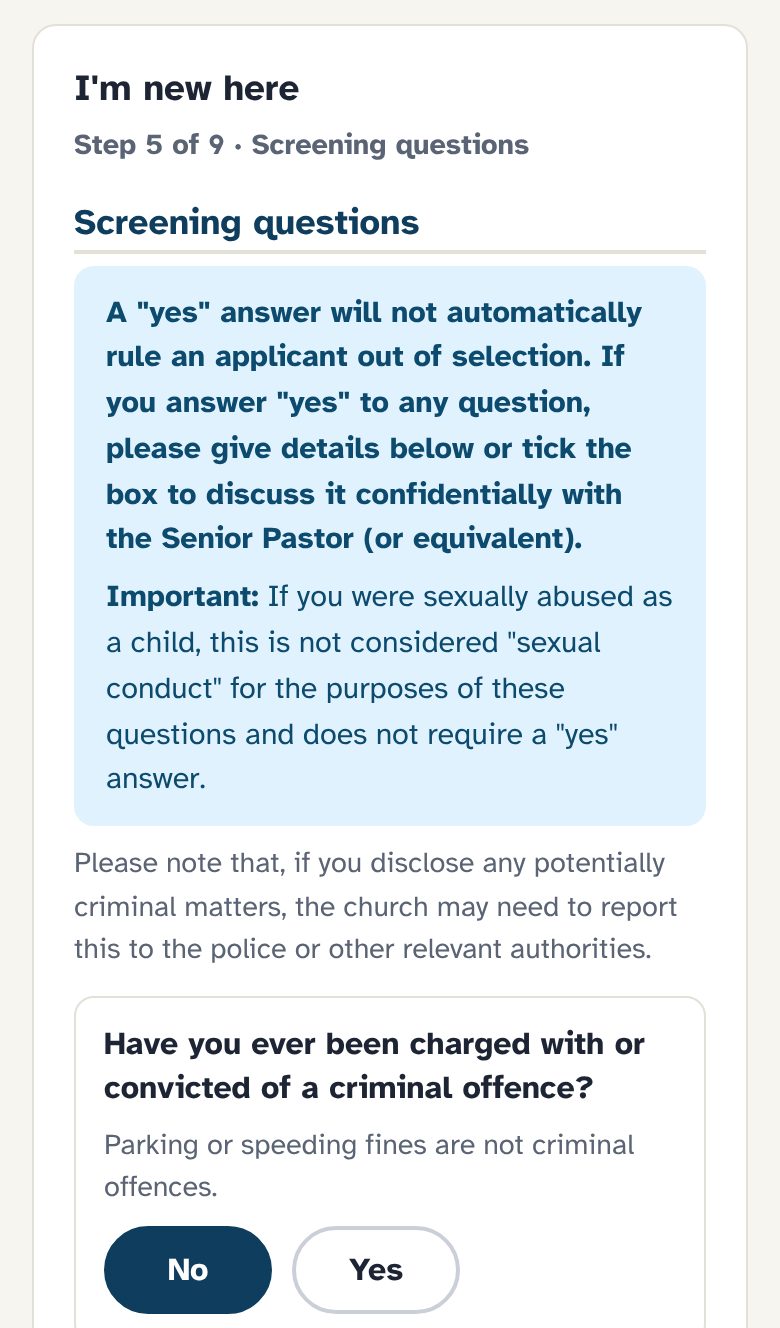
Under I'm new here, the application walks you through one section at a time, with Next and Back buttons. It replaces the paper Volunteer Application & Screening Questionnaire.
- About you
Your name, contact details, date of birth, address and any previous names. If you're under 18, you'll also give a parent or guardian's details – and you'll see the under-18 version of the questions.
- How you'd like to serve
Pick the role and ministry area that fits, and tell us a little about why you'd like to serve. Not sure? Choose I'm not sure yet – your Safe Church Team will confirm it.
- Health, screening questions and driving
Answer each yes/no question. A "yes" opens a box for details – or tick to talk it through confidentially with the Senior Pastor instead. Driving questions only appear if your role involves driving.
- Churches, referees and the declaration
List churches you've attended, give two referees, then read the declaration (including the Code of Conduct) and type your name to sign. Under 18? Hand your phone to your parent or guardian to sign too.
When you submit, we email you a link so you can come back later. Roles that don't need the full questionnaire (like welcome or music) just ask for your consent.
4Work through your checklist
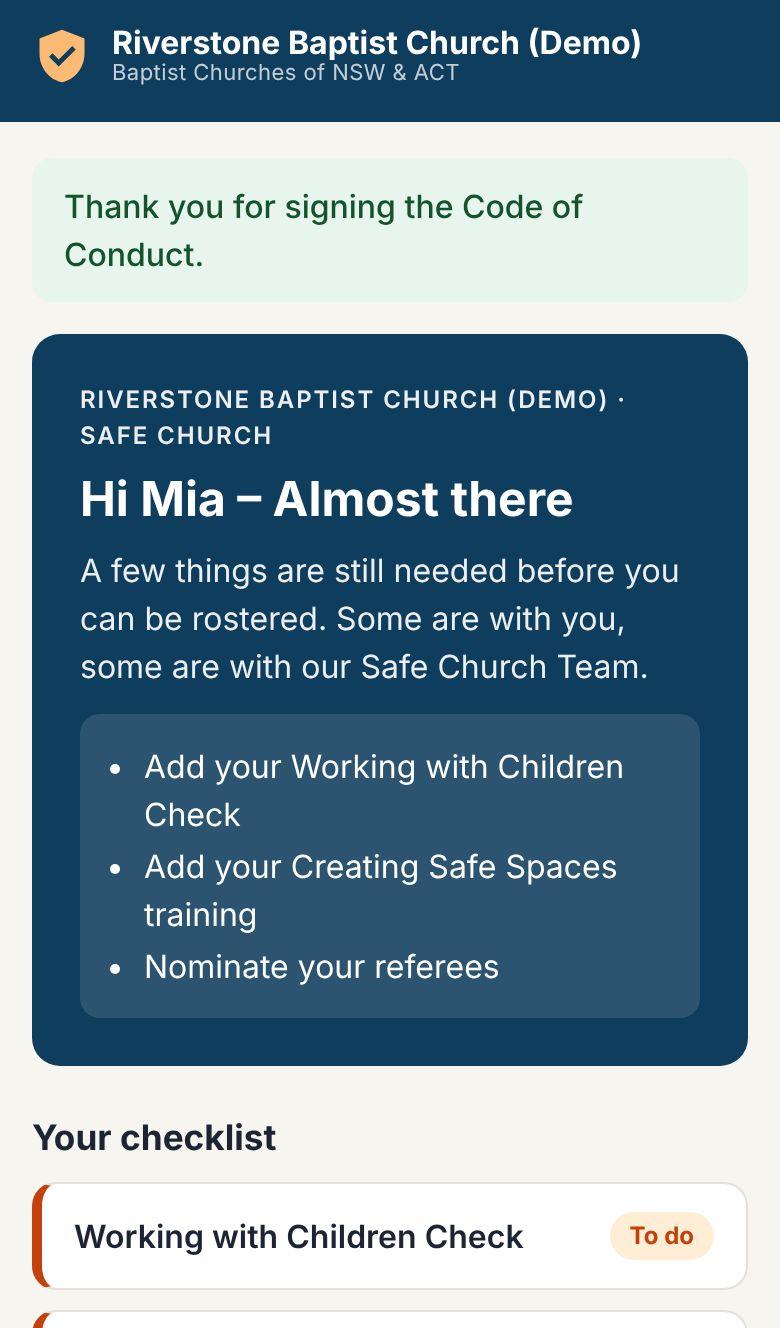
Your checklist shows only what your role needs. Each item is marked To do, With the team to verify, Done, Renew soon or Expired. Tap an item to open it.
Working with Children Check
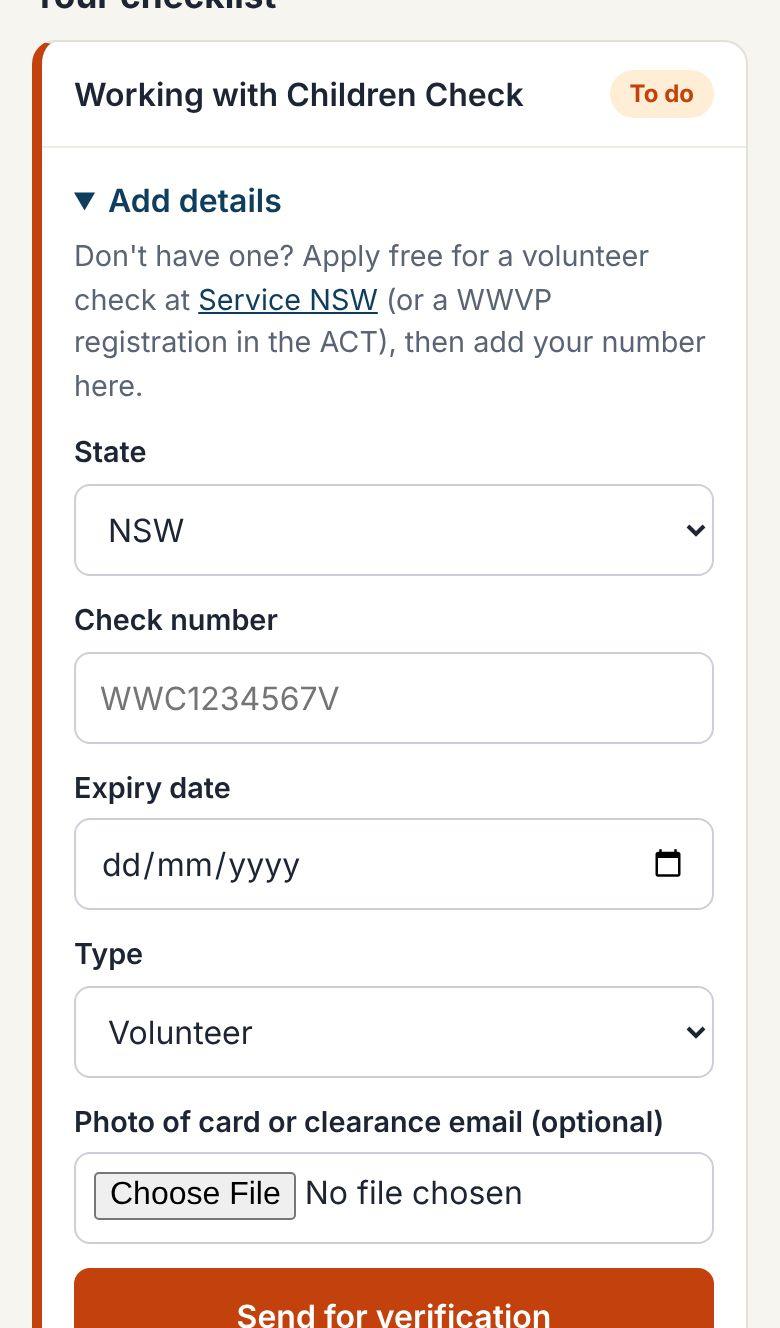
Enter your check number exactly as it appears – in NSW it looks like WWC1234567V – plus the expiry date, and choose Volunteer or Paid. A photo of your card or clearance email is helpful but optional.
Don't have one? In NSW, apply online through Service NSW – it's free for volunteers – then finish the application in person at a service centre. In the ACT, apply for a Working with Vulnerable People registration through Access Canberra. Add your number here once it arrives.
Applied but still waiting? You can enter your application number (it starts with APP). Your record will show "application in progress" – it doesn't clear you to serve yet, so come back and update it with your WWC number when it arrives.
Under 18? In NSW you don't need a WWCC until you turn 18. If your church has this turned on, your checklist will say so, and we'll remind you to apply before your 18th birthday.
Creating Safe Spaces training
Enter the date you completed the course and upload your certificate. Your Safe Church Team will sight it and mark it accepted. Haven't done the training yet? Ask your church about the next session.
Police check
Only some roles need a national police check – usually pastors, staff and Safe Church Team members. If it's on your checklist, enter the date on the certificate and upload it.
Code of conduct
Read your church's code of conduct, type your full name and tick the box to sign. You'll be asked to sign it again each year.
Screening questionnaire
You complete this when you register, and again every few years. If you were added by your church rather than registering yourself, it's on your checklist. Please answer honestly. A "yes" doesn't automatically stop you serving – a senior member of the Safe Church Team will talk it through with you privately. Your answers are never shown to ministry leaders or other volunteers.
Other certificates
Some churches ask for extra certificates for some roles – first aid for camp leaders, for example. If one is on your checklist, enter the date and upload a copy, just like your training certificate.
Referees
Add people who know you well and have seen you around others – a small group leader, a former ministry leader, an employer or teacher. Family members can't be referees. Let them know to expect a short phone call from our Safe Church Team – or, at some churches, an email with a link to a few questions.
5What happens next
Once you've sent everything, our Safe Church Team checks your Working with Children Check on the state register, sights your certificates and contacts your referees. You don't need to do anything while that happens. Your page shows where things are up to:
- Cleared
- Everything is done and current. You can be rostered.
- Pending
- Something is still needed – either from you, or our team is checking it. Your checklist shows which.
- Lapsed
- Something that was done has expired – usually training or the code of conduct. Renew it from your checklist.
- On hold
- Your record is with our Safe Church Team. They'll be in touch – you don't need to do anything.
When you're cleared, your page turns green and says "You're cleared to serve".
6Coming back later
You don't need a password. Use the Update my Safe Church record button in any email we send you, or go to the volunteer sign-in page and enter your email to get a fresh link.
7Reminders and renewals
We'll email you before anything expires – usually 90, 60 and 30 days ahead – with a link straight to your record. If something is still outstanding, you'll get a gentle reminder at the frequency your church has chosen.
Moved, changed your number, or no longer serving? Update your details from your record, or let your Safe Church Team know.
8Your information
Your details are kept in your church's Safe Church Register and used only to check that you are safe to serve and to keep your record current.
- You see only your own record.
- Ministry leaders see only whether you're cleared – not your details.
- Your church's Safe Church Team sees your full record so they can verify it.
- Every time someone opens your record, it's logged.